SteadyPips EA
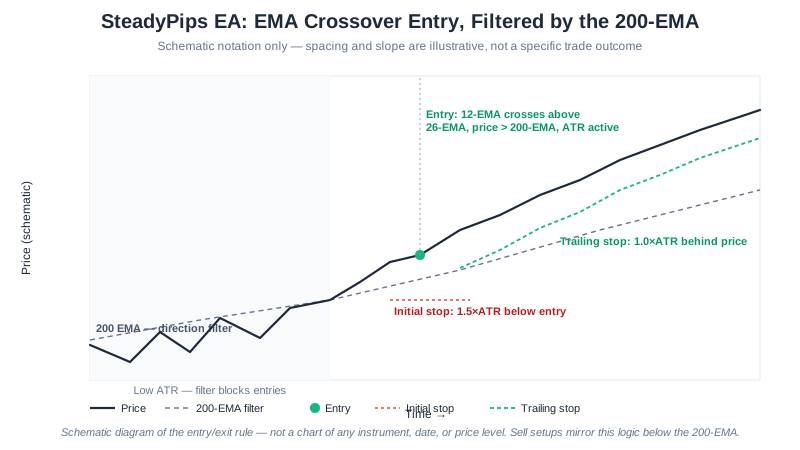
SteadyPips is the baseline trend-follower in this suite: a single 12/26 EMA crossover, gated by a 200-EMA directional filter so it only takes trades in the direction of the larger trend, and skipped entirely when ATR shows the market is too quiet to bother. Where TripleAlign stacks three EMAs and an ADX threshold before it will fire, SteadyPips deliberately keeps the entry logic to one crossover — fewer conditions to satisfy means more signals, at the cost of catching a few weaker moves along the way.
SteadyPips is free to download for MetaTrader 4 and MetaTrader 5, one of several distinct types of automated trading algorithms we publish. ATR-based stops and a trailing exit round out the position management once a trade is open.
Developer disclosure: We built SteadyPips. This page is our own technical assessment, not an independent third-party review. We do not yet publish a measured backtest table for SteadyPips — the diagram above is a rule-based schematic of the entry/exit logic, not a profit result. See our backtest methodology and results for the EAs we do have tested figures for, including the July 30, 2026 correction to our testing pipeline. Demo-test SteadyPips for several weeks before running it live.
What Is Trend Following?
Trend following is a strategy that enters in the direction of the prevailing move and exits when the move reverses. It does not try to predict tops or bottoms — instead it waits for the market to confirm a direction, joins it, and trails a stop until the trend ends. A handful of strong trends per year is typically enough to cover many small losing trades, which is why trend followers accept a win rate well under 50% by design.
How It Works
- Trend detection — Calculates 12 EMA and 26 EMA on the working timeframe
- Direction filter — Requires price above the 200 EMA for longs (below for shorts)
- Volatility filter — Skips signals when ATR is below the configured threshold
- Entry trigger — Enters on EMA crossover in the direction of the 200 EMA
- Dynamic exits — ATR-based stop and target with trailing stop as the trade extends
Entry Conditions
Buy signal:
- Fast EMA (12) crosses above Slow EMA (26)
- Price is above the 200 EMA (uptrend confirmed)
- ATR is above the minimum threshold (market is active)
Sell signal:
- Fast EMA (12) crosses below Slow EMA (26)
- Price is below the 200 EMA (downtrend confirmed)
- ATR is above the minimum threshold
Key Features
| Feature | Details |
|---|---|
| Strategy | EMA(12/26) crossover with EMA(200) filter |
| Timeframe | H1 (recommended) |
| Pairs | EURUSD, GBPUSD, USDJPY, AUDUSD |
| Indicators | EMA (12, 26, 200), ATR (14) |
| Risk per trade | 2% (configurable) |
| Stop-loss | 1.5× ATR (dynamic) |
| Take-profit | 2.0× ATR (≈ 1:1.33 R:R) |
| Trailing stop | 1.0× ATR |
| Platform | MetaTrader 4 and MetaTrader 5 |
| Price | Free |
Configuration
| Parameter | Default | Range | Description |
|---|---|---|---|
| RiskPercent | 2.0 | 0.5–5.0 | Account % risked per trade |
| FastEMA | 12 | 8–20 | Fast EMA period |
| SlowEMA | 26 | 20–40 | Slow EMA period |
| TrendEMA | 200 | 100–250 | Direction-filter EMA |
| SL_ATR_Multi | 1.5 | 1.0–3.0 | Stop-loss as ATR multiple |
| TP_ATR_Multi | 2.0 | 1.5–3.5 | Take-profit as ATR multiple |
| TrailATR | 1.0 | 0.5–2.0 | Trailing stop ATR distance |
| MaxTrades | 3 | 1–5 | Concurrent open positions |
| MaxDailyTrades | 5 | 1–10 | Daily entry cap |
Risk Controls (Built In)
These settings limit how much a single configuration can lose; they do not make automated trading safe.
- ATR-based stops — Stop-loss and take-profit adapt to current market volatility
- Trailing stop — Locks in profits as the trend extends
- Volatility gate — No entries during dead markets (avoids whipsaws)
- Position limit — Max 3 concurrent open trades
- Daily trade limit — Max 5 entries per day to prevent overtrading
- Automatic lot sizing — Position size derived from account balance × risk %
Best Pairs, Timeframes, and Account Size
- Timeframe: H1 (1-hour) is the sweet spot — enough signals per week without H4-style lag or M15 noise
- Pairs: EUR/USD, GBP/USD, USD/JPY, AUD/USD — major pairs with clean trends and tight spreads
- Avoid: Exotics and minors during news — wide spreads erode the 1:1.33 risk/reward
- Accounts: $500+ balance for the default settings to size cleanly
| Account size | RiskPercent | MaxTrades | SL_ATR | TP_ATR |
|---|---|---|---|---|
| $200 – $500 | 1.0 | 2 | 2.0 | 2.5 |
| $500 – $2,000 | 2.0 | 3 | 1.5 | 2.0 |
| $2,000 – $10,000 | 2.0 | 3 | 1.5 | 2.0 |
| $10,000+ | 1.5 | 3 | 1.5 | 2.5 |
Smaller accounts use a tighter risk percent (lower drawdown tolerance) and a wider ATR stop (fewer noise stop-outs). Larger accounts prioritize capital preservation over compounding speed.
Very small accounts ($100–$300): switch to fixed lots — set UseFixedLot = true and FixedLotSize = 0.01 so a single stop-out can’t take an outsized bite while the balance is tiny.
Strengths and Risks
Strengths
- Simple, transparent logic that is easy to audit and reason about
- Captures large directional moves with the trailing stop
- Stays flat in ranges thanks to the ATR filter, avoiding most chop
- Works identically on MT4 and MT5 with the same settings
Risks
- Whipsaws during low-volatility ranges produce a string of small losses
- Reversals against an established trend can hit the trailing stop before the EA exits cleanly
- News-driven gaps can blow through the ATR stop on illiquid pairs
- Like any trend follower, expects a 40–50% win rate — the math relies on average win > average loss
Getting Started
- Open a free XM account if you don’t have one
- Fund it with $200 or more — the minimum the EAs are designed for (deposit walkthrough)
- Register your account to activate the EA
- Download SteadyPips EA (both MT4 .ex4 and MT5 .ex5 are provided)
- Install on MetaTrader following our step-by-step guide
- Attach to an H1 chart of EURUSD or GBPUSD and confirm “AutoTrading” is enabled
Note: In MetaTrader, enable WebRequest for
api.steadypips.net(Tools → Options → Expert Advisors → “Allow WebRequest for listed URL”) so the EA can validate its free license. Test on a demo account for 2–4 weeks before going live.
How SteadyPips Compares to Our Other EAs
| SteadyPips | GridMaster | BreakWave | TripleAlign | |
|---|---|---|---|---|
| Style | EMA trend | Grid trading | Breakout | Multi-EMA trend |
| Best market | Trending | Ranging | Range → breakout | Strong trends |
| Entry logic | EMA crossover | Fixed grid levels | BB squeeze + ADX | Triple EMA + ADX |
| Risk:reward | 1:1.33 | Variable | 1:1.33 | 1:2 |
| Trade frequency | 3–8 / week | Continuous | 2–5 / week | 1–3 / week |
Frequently Asked Questions
Is SteadyPips EA really free? The EA itself costs nothing. Running it does require a live XM account opened through our link — we earn a commission from XM on that account, and that is what funds the EA.
What’s the minimum deposit to run it? XM allows accounts with as little as $5, but we recommend $500+ so the EA’s position-sizing math operates cleanly — see the account-size table above for how RiskPercent and MaxTrades scale down for smaller balances.
Does SteadyPips work on MT5, and do I need to use XM specifically?
Yes — both MT4 (.ex4) and MT5 (.ex5) builds are available from the download page. The EA is designed and tested for XM, and account verification runs through our registration system, so it isn’t built to run against other brokers’ price feeds.
SteadyPips or TripleAlign — which one should I run? Both are trend-following, but SteadyPips uses a simpler EMA crossover for more frequent signals, while TripleAlign demands three aligned EMAs plus ADX confirmation and trades less often but with higher selectivity. Use SteadyPips if you want more trades; use TripleAlign if you only want to be in the market during the strongest trends.
Why does SteadyPips sit out some weeks entirely? The ATR volatility filter blocks entries when the market is too quiet, even if the 12/26 EMA cross fires. On H1 that still leaves roughly 3–8 trades per week per pair on average, but a genuinely quiet week can produce zero — that is the filter doing its job, not a malfunction.
What actually happens if my VPS connection drops mid-trade? SteadyPips makes signal decisions at every bar close, so a dropped connection at the wrong moment can miss an entry or a trailing-stop adjustment. A $5–$10/mo Forex VPS removes that risk, which is why we recommend one — see our VPS guide.
Further Reading
- Moving Average Strategies — the foundation of trend-following
- How to Install an EA on MetaTrader — step-by-step setup
- How to Backtest a Forex EA — validate settings before live trading
- Forex Risk Management Guide — protect your capital
- VPS for Forex Trading — run your EA 24/7 without interruption
- TripleAlign EA — compare with our stricter, triple-confirmation trend EA
Trading forex carries significant risk. Past performance is not indicative of future results. Please read our risk disclosure before trading.
Affiliate Disclosure: This page contains affiliate links to XM. We receive a commission when you open an account through our links, at no additional cost to you. Full disclosure