TripleAlign EA
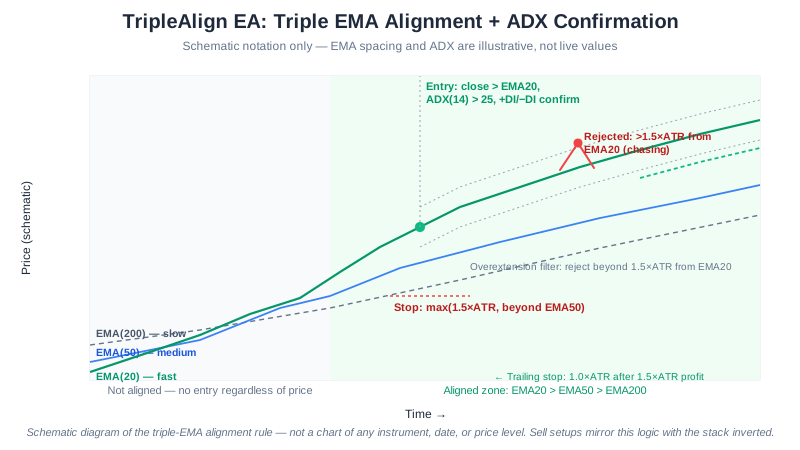
Single-indicator trend systems generate plenty of entries, but a large share turn out to be whipsaws in a disguised range. TripleAlign is our answer to that problem: it stacks three independent filters — three EMAs in hierarchical alignment, an ADX strength threshold, and an overextension check — and only fires when all of them agree. That is deliberately the strictest entry logic in the suite; where SteadyPips takes a single crossover, TripleAlign asks the market to prove itself three separate ways first.
TripleAlign is free to download for MetaTrader 4 and MetaTrader 5, one of several distinct types of automated trading algorithms we publish. The trade-off for the extra scrutiny is fewer signals: it sits out marginal setups that a looser system would take, in exchange for skewing the trades it does place toward higher-conviction trends.
Developer disclosure: We built TripleAlign. This page is our own technical assessment, not an independent third-party review. We do not yet publish a measured backtest table for TripleAlign — the diagram above is a rule-based schematic of the entry/exit logic, not a profit result. See our backtest methodology and results for the EAs we do have tested figures for, including the July 30, 2026 correction to our testing pipeline. Demo-test TripleAlign for several weeks before running it live.
What Is Multi-Confirmation Trend Following?
Multi-confirmation trend following stacks independent filters so an entry only fires when all signals agree, rather than relying on any single indicator. The result is fewer trades, but a larger share of those trades line up with real trends rather than noise — the trade-off is accepting that the system will sit out many marginal setups where a single-indicator EA would have entered.
How It Works
- Triple EMA alignment — Confirms trend when EMA(20) > EMA(50) > EMA(200) for buys (reversed for sells)
- ADX trend strength — Requires ADX > 25 with +DI/−DI confirming the move
- Price confirmation — Waits for a candle close beyond the fast EMA to confirm entry timing
- Overextension filter — Rejects entries when price is more than 1.5× ATR from EMA(20), avoiding chasing
- Dynamic exits — ATR-based stop and target, with trailing stop after the trade proves itself
Entry Conditions
Buy signal:
- EMA(20) > EMA(50) > EMA(200) — three EMAs aligned bullish
- ADX > 25 and +DI > −DI (trend strength + bullish bias)
- Latest candle closes above EMA(20)
- Price is within 1.5× ATR of EMA(20) (not overextended)
Sell signal:
- EMA(20) < EMA(50) < EMA(200) — three EMAs aligned bearish
- ADX > 25 and −DI > +DI
- Latest candle closes below EMA(20)
- Price is within 1.5× ATR of EMA(20)
Key Features
| Feature | Details |
|---|---|
| Strategy | Triple EMA alignment with ADX filter |
| Timeframe | H1 (recommended) |
| Pairs | EURUSD, GBPUSD, USDJPY, AUDUSD |
| Indicators | EMA (20, 50, 200), ADX (14), ATR (14) |
| Risk per trade | 2% (configurable) |
| Stop-loss | max(1.5× ATR, beyond EMA(50)) |
| Take-profit | 3.0× ATR (1:2 R:R) |
| Trailing stop | 1.0× ATR (activates after 1.5× ATR profit) |
| Platform | MetaTrader 4 and MetaTrader 5 |
| Price | Free |
Configuration
| Parameter | Default | Range | Description |
|---|---|---|---|
| RiskPercent | 2.0 | 0.5–5.0 | Account % risked per trade |
| EMA_Fast | 20 | 15–30 | Fast EMA period |
| EMA_Medium | 50 | 40–60 | Medium EMA period |
| EMA_Slow | 200 | 150–250 | Slow / trend EMA |
| ADX_Threshold | 25 | 20–35 | Minimum ADX to confirm trend |
| SL_ATR_Multi | 1.5 | 1.0–2.5 | ATR-based stop multiple |
| TP_ATR_Multi | 3.0 | 2.0–4.0 | Take-profit multiple (drives 1:2 R:R) |
| TrailATR | 1.0 | 0.5–2.0 | Trailing stop ATR distance |
| TrailTriggerATR | 1.5 | 1.0–2.5 | Profit (in ATR) before trail activates |
| OverextATR | 1.5 | 1.0–2.5 | Max distance from EMA(20) for entry |
Risk Controls (Built In)
These settings limit how much a single configuration can lose; they do not make automated trading safe.
- Dual stop-loss logic — Uses the more protective of ATR-based or EMA(50)-based stop-loss
- Trailing stop — Locks in profits as the trend extends, trailing at 1× ATR
- Overextension filter — Rejects entries when price is more than 1.5× ATR from EMA(20)
- ADX gate — No entries unless trend strength confirms (avoids ranging-market whipsaws)
- Position limit — Max 3 concurrent open trades
- Daily trade limit — Max 5 entries per day
- Automatic lot sizing — Position size derived from account balance × risk %
Best Pairs, Timeframes, and Account Size
- Timeframe: H1 — enough signals per week while still respecting the triple-EMA alignment
- Pairs: EUR/USD, GBP/USD — strongest and cleanest trending behavior with tight spreads
- Also viable: USD/JPY, AUD/USD when carry/macro themes drive sustained directionality
- Avoid: Range-bound pairs without macro drivers — the EA will simply not trade
- Accounts: $500+ balance, major Forex pairs with clear trending behavior
| Account size | RiskPercent | ADX_Threshold | TP_ATR | OverextATR |
|---|---|---|---|---|
| $200 – $500 | 1.0 | 30 | 2.5 | 1.2 |
| $500 – $2,000 | 2.0 | 25 | 3.0 | 1.5 |
| $2,000 – $10,000 | 2.0 | 25 | 3.0 | 1.5 |
| $10,000+ | 1.5 | 22 | 3.5 | 1.8 |
Smaller accounts pair tighter risk with stricter ADX and overextension filters (fewer, higher-conviction entries). Larger accounts can run looser filters and ride wider targets.
Strengths and Risks
Strengths
- Highest win rate in the SteadyPips suite thanks to triple confirmation
- Wider 1:2 risk/reward target produces large winners that easily cover smaller losses
- Overextension filter eliminates the worst trades (chasing late breakouts)
- Stays completely flat in ranges — no whipsaw losses
Risks
- Low trade frequency — some weeks see zero entries, which can feel frustrating
- Misses some valid trends entirely (overextension filter rejects late entries on fast-moving trends)
- Reversal at the EMA(50) zone can hit the stop even on otherwise valid trends
- Performance highly dependent on whether the broader market is trending vs ranging
Getting Started
- Open a free XM account if you don’t have one
- Fund it with $200 or more — the minimum the EAs are designed for (deposit walkthrough)
- Register your account to activate the EA
- Download TripleAlign EA (both MT4 .ex4 and MT5 .ex5 are provided)
- Install on MetaTrader following our step-by-step guide
- Attach to an H1 chart of EURUSD or GBPUSD and confirm “AutoTrading” is enabled
How TripleAlign Compares to Our Other EAs
| SteadyPips | GridMaster | BreakWave | TripleAlign | |
|---|---|---|---|---|
| Style | EMA trend | Grid trading | Breakout | Multi-EMA trend |
| Best market | Trending | Ranging | Range → breakout | Strong trends |
| Entry logic | EMA crossover | Fixed grid levels | BB squeeze + ADX | Triple EMA + ADX |
| Risk:reward | 1:1.33 | Variable | 1:1.33 | 1:2 |
| Trade frequency | 3–8 / week | Continuous | 2–5 / week | 1–3 / week |
Frequently Asked Questions
How is TripleAlign different from SteadyPips EA? Both are trend-following, but TripleAlign requires three aligned EMAs plus ADX > 25, while SteadyPips uses a simpler 12/26 EMA crossover with a 200-EMA direction filter. TripleAlign trades less often but with higher selectivity and a wider 1:2 target. Use SteadyPips for more trades; use TripleAlign when you only want to be in the market during the strongest trends.
Will TripleAlign double my exposure if I also run SteadyPips or DualHorizon? They can share an account without technical conflict — TripleAlign tags its orders with magic number 111501, so each EA tracks only its own positions. The real caution is correlation, not order handling: all three are trend systems, so in a strong trend they may hold positions in the same direction at once. Size each EA’s RiskPercent as if all three were drawing on one shared risk budget.
What happens in ranging markets? TripleAlign stays completely flat. The triple-EMA alignment and ADX > 25 requirements simply don’t fire in ranges — that is by design. Sitting out ranges is the trade-off for missing the occasional early trend entry; whether it produces a shallower drawdown than a simpler trend system depends entirely on the period and settings tested.
How often does TripleAlign actually trade? Roughly 1–3 trades per week per pair on H1, and a genuinely quiet week can produce zero entries — that is the triple-confirmation filter doing its job. Fewer trades also means a smaller sample behind any statistic, so read the current backtest tables rather than inferring a win rate from frequency.
Does TripleAlign need to run 24/5 on a VPS? Recommended. Alignment confirmations can complete in any session, and a missed entry candle cannot be recovered — an always-on connection matters more for a system that only fires a few times a week. See our VPS guide.
Further Reading
- Moving Average Strategies Guide — how EMAs work as trend filters
- Technical Analysis Basics — ADX, ATR, and supporting indicators
- How to Install an EA on MetaTrader — step-by-step setup
- How to Backtest a Forex EA — validate settings before going live
- Forex Risk Management Guide — protect your capital
- SteadyPips EA — compare with our simpler, higher-frequency trend EA
Trend trading involves significant risk. Past performance is not indicative of future results. Please read our risk disclosure before trading.
Affiliate Disclosure: This page contains affiliate links to XM. We receive a commission when you open an account through our links, at no additional cost to you. Full disclosure