What Is a Forex Expert Advisor (EA)?
A forex Expert Advisor (EA) is an automated trading program that runs inside the MetaTrader platform and places, manages and closes trades on your account without you being present. “EA” is simply the MetaTrader name for what other platforms call a trading bot, robot or algo — it follows a fixed rule set written in code, with no discretion of its own.
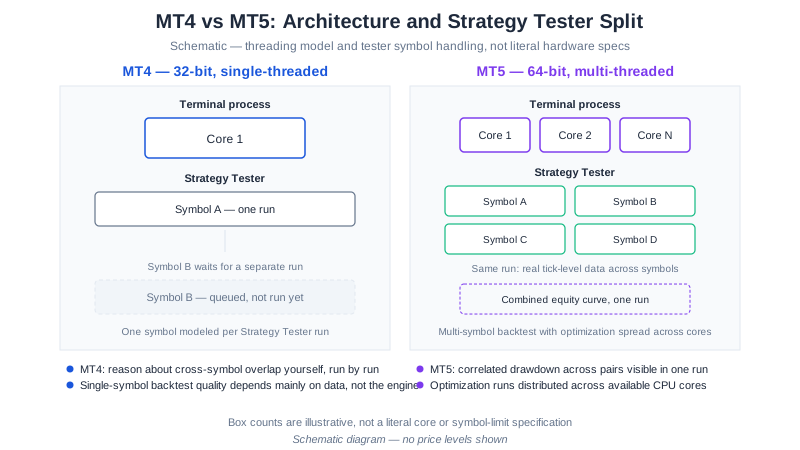
On MetaTrader 4 an EA is written in MQL4 and compiled to an .ex4 file; on MetaTrader 5 it is MQL5 and .ex5. Both run the same way: you attach the file to a chart, switch AutoTrading on, and the program takes over execution for that symbol and timeframe. The two platforms differ well beyond file format — see MT4 vs MT5: which should you run your EA on for the backtesting, account-mode, and broker-support differences that actually matter.
The critical thing to understand before anything else: an EA is an execution tool, not a strategy and not an income source. It contains someone’s trading rules and follows them without deviation. If those rules have no edge, the EA will apply a losing method with perfect discipline. Everything else on this page follows from that.
EA vs Manual Trading vs Copy Trading
The three ways a retail trade can reach the market. They fail in different places, which is the useful part of the comparison.
| Expert Advisor | Manual trading | Copy trading | |
|---|---|---|---|
| Who decides the trade | Your EA’s rule set | You, in the moment | Another trader you follow |
| Who presses the button | The EA | You | The provider’s platform, on your account |
| Runs while you sleep | Yes, if the terminal stays on | No | Yes |
| Rules visible to you | Yes, if the vendor discloses them | Yes — they are yours | Rarely; you see results, not logic |
| Can be backtested | Yes, on historical data | Not reliably | No — only the provider’s past record |
| Execution consistency | Identical every time | Varies with mood, fatigue, screen time | Consistent, but not yours to adjust |
| Reaction speed | Milliseconds | Seconds to minutes | Provider’s speed plus copy latency |
| What you control | Every input parameter | Everything | Position size, and whether to stop |
| Main failure mode | Rules that were fitted to past data | Emotional deviation from the plan | Provider changes style, or blows up |
| Learning value | Forces you to define rules explicitly | High, if you keep records | Low — you learn nothing about why |
Copy trading and EAs are frequently confused because both trade without you. The difference is where the reasoning lives: an EA’s logic is a file you can read, test and switch off parameter by parameter, while a copy-trading provider’s logic stays in their head. An EA also cannot decide to triple its risk after a bad week; a human provider can, and you will find out afterwards.
Manual trading is not the loser in this table. It is the only column where judgement can respond to something the rules never anticipated — the cost being that the same judgement is what moves stops and revenge-trades. Automation trades away flexibility for consistency, deliberately.
Expert Advisor at a Glance
| Question | Answer |
|---|---|
| What is it? | An automated program that runs inside MetaTrader and places, manages, and closes trades from a fixed rule set. |
| Language and file type | MQL4 compiled to .ex4 on MT4; MQL5 compiled to .ex5 on MT5. |
| Where it runs | Inside your MetaTrader terminal — not on the broker’s server. |
| Does it create an edge? | No. It automates a rule set; a losing rule set simply loses faster. |
| Coding required? | None to run one. Only to build or modify one. |
| Keeping it live 24/5 | A VPS, typically $10–30/month. |
| Minimum demo test | 30 days before any live capital. |
| Main failure modes | Curve fitting, regime change, and real execution costs (spread, slippage, requotes). |
| SteadyPips EAs | Seven, free, in MT4 and MT5 builds; published figures are labelled hypothetical. |
An Expert Advisor runs inside the MetaTrader terminal rather than on the broker’s server, so if the terminal closes or the machine loses connection the EA stops managing open positions — stops and targets already placed with the broker remain live (SteadyPips, as of August 2026). SteadyPips publishes seven free Expert Advisors in MT4 and MT5 builds, each with a hard stop on every trade, a position cap, and no martingale logic.
The chart above shows the EUR/USD price action that a forex EA would continuously monitor for trading signals. Reading price structure like this by hand is the manual equivalent of what an EA does mechanically — our EUR/USD technical analysis guide covers how those levels are identified.
Want to see one running? Our seven EAs are free in both MT4 and MT5 builds — /download/.
How an EA Actually Executes a Trade
Every EA, however complex, cycles through the same five stages on each new price tick or bar:
- Market analysis — The EA recalculates its indicators (moving averages, RSI, ATR, Bollinger Bands, whatever the strategy uses) from the incoming price feed.
- Signal generation — It tests its entry conditions against those values. Conditions are boolean and exact: “EMA(12) crossed above EMA(26) and price is above EMA(200) and ATR exceeds the minimum threshold.” All conditions true, or no trade.
- Position sizing — It calculates lot size, typically as a fixed percentage of account equity divided by the stop distance, so the monetary risk per trade stays constant as the account changes size.
- Order execution — It sends the order to the broker with its stop loss and take profit attached, usually within milliseconds of the signal.
- Trade management — It monitors the open position, trailing the stop, moving to break-even, or closing on an exit condition. Then the cycle repeats.
The Same Five Stages, Walked Through Once
Abstract stages are hard to picture, so here is one pass through the loop for a simple EMA-crossover EA on EUR/USD H1. The numbers are round illustrative figures chosen so the arithmetic is checkable — not a signal, not a recommendation, and not a result.
Tick arrives, 14:00:03. The H1 bar just closed. The EA wakes on the first tick of the new bar, because its rules are defined on closed bars rather than live price.
Stage 1 — recalculate. It pulls the last 200 H1 closes and recomputes EMA(12), EMA(26), EMA(200) and ATR(14). This takes microseconds and happens whether or not anything interesting has occurred.
Stage 2 — evaluate the conditions. Three booleans, evaluated in order:
EMA(12) > EMA(26)          → true   (crossed up on this bar)
close    > EMA(200)         → true   (trend filter passes)
ATR(14) > minimum threshold → true   (enough volatility to bother)
All three true, so a signal exists. If any one had been false the EA would return and wait for the next bar — no partial entries, no “close enough.”
Stage 3 — size the position. The stop is defined as 2 × ATR(14). Say that computes to 30 pips. With a $2,000 balance and a 1% risk input:
risk in dollars = $2,000 × 1%          = $20
loss per lot    = 30 pips × $10/pip    = $300
lots            = $20 / $300           = 0.066 → rounds down to 0.06
Note what just happened: the lot size was derived, not chosen. Change the risk input to 4% and the same signal becomes a 0.26-lot position on the same account. The signal did not get better; the consequences got four times larger.
Stage 4 — send the order. The EA transmits a market buy for 0.06 lots with the stop-loss price and take-profit price attached in the same request, so both sit with the broker rather than in the EA’s memory. It stamps the order with its magic number, which is how it recognises its own positions later and ignores yours.
Stage 5 — manage, then repeat. On every subsequent tick the EA checks the open position against its exit rules: move the stop to break-even once price is one ATR in profit, trail thereafter, close on an opposite cross. When the position closes, the loop returns to stage 1 and the EA waits for the next bar as though nothing had happened.
Two observations worth carrying away. First, nothing in that sequence contains judgement — every branch was a comparison against a number, which is exactly what makes an EA testable and exactly what makes it blind to context the rules never encoded. Second, the only stage you influence is stage 3, through the inputs panel. That is the whole of your control surface once the EA is running.
Where the EA Actually Runs
An EA runs inside your MetaTrader terminal, not on the broker’s server. If your computer sleeps, loses its connection, or MetaTrader closes, the EA stops managing your open positions — though stops and targets already placed with the broker remain live. This is why most people running EAs seriously use a VPS: a cloud machine that keeps MetaTrader running 24/5 near the broker’s servers.
Inputs: The Part That Determines Your Outcome
When you attach an EA you get an inputs panel — risk percent, stop multiplier, maximum positions, allowed hours, magic number. These are not cosmetic. The same EA at 1% risk per trade and at 8% risk per trade are, in practice, different products with completely different drawdown profiles. Most EA disasters are configuration disasters, not code disasters.
Before you accept whatever an EA’s default risk-percent input computes, check what it actually means in lots for your own balance:
Position-size calculator
Enter your account balance and stop-loss distance above to calculate.
Educational tool, not investment advice. Verify the calculation and your broker's minimum lot size before placing a trade.
Do EAs Make Money? Are Expert Advisors Profitable?
This is the question the whole category rests on, so here is the honest answer: many are not, and profitability is not a property of automation.
An EA cannot manufacture an edge. It can only apply the rules it was given. What automation genuinely provides is removal of execution error — no skipped signals, no widened stops, no revenge trades, no “just one more lot.” That is real value, and it is also the only value. If the underlying strategy has negative expectancy, automation converts an inconsistently losing trader into a consistently losing one.
Three reasons EAs with good backtests fail live:
- Curve fitting. A strategy chosen because it performed well on a stretch of history is, by construction, at risk of having been fitted to that history’s noise. This is the single most common failure mode, and it is why our own performance page labels every figure as hypothetical.
- Regime change. Trend-following systems built during trending years quietly bleed through ranging years. Mean-reversion systems built during ranges get destroyed by a sustained trend. No rule set is regime-neutral.
- Real execution costs. Spread widening, slippage on news, and requotes appear in live trading in ways simulations understate — and they hit high-frequency strategies hardest, exactly the strategies that look best in a backtest.
What a realistic expectation looks like: an EA that is documented, hard-stopped, tested out-of-sample, and run at conservative risk may produce modest returns in the conditions it was designed for, and will have losing months. Any EA advertising a specific monthly return, “guaranteed” profits, or triple-digit annual ROI is over-optimized, martingale-based, or fabricated. Our guide to choosing an EA in 2026 works through the specific red flags.
What honest testing looks like, using our own results as the example
It is easy to write “be sceptical of published figures” and quietly exempt yourself. So here is what happened to ours.
On July 30, 2026 we found a defect in our own backtest engine: it was decoding each hourly bar’s high and low in the wrong order. Every stop-loss and take-profit touch check, and every ATR and ADX value built on top of the bar range, had therefore been computed on impossible price data. We fixed the decoder, deleted and re-downloaded the cached data, and re-ran every published test with no changes to any EA’s parameters.
The corrected numbers were worse than the ones we had been showing, and we published them anyway. Against our own gate — profit factor above 1.3, maximum drawdown below 30%, and more than 50 trades over the 2024-01 → 2026-03 window — the restated position was:
| EA | After the corrected re-run |
|---|---|
| SnapBack | Still passes on EURUSD and GBPUSD, though GBPUSD is materially weaker than the figure we had shown |
| DualHorizon | Passes on EURUSD only — USDJPY, which we had previously recommended, no longer clears the gate |
| QuickPulse | Does not pass on any pair. Not recommended for live use until a re-worked version clears clean data |
The full restatement, with the trade counts and drawdown figures behind it, stays permanently on our performance page as a dated correction entry rather than being overwritten.
Three things that episode is meant to demonstrate, none of them flattering:
- A backtest is software, and software has bugs. The equity curves looked entirely plausible before the fix. Nothing in the output would have told a reader the input data was impossible.
- The direction of a correction is diagnostic. Corrections that make published results better are rare in this industry, which tells you something about which errors get chased down.
- A vendor with no correction history is not necessarily accurate. They may simply have never re-checked, or never published what they found.
When you evaluate anyone’s EA figures — ours included — the useful question is not “how good are these numbers” but “what would have to be true for them to be wrong, and would this vendor tell me.” Before you believe any performance figure, learn how backtests are constructed and where they mislead: how to backtest a forex EA.
Advantages of Using an EA
Emotion-free execution EAs follow their programmed rules without fear, greed, or hesitation. This eliminates the emotional mistakes that account for a large share of retail losses — moving a stop “just this once,” or doubling down after a loss.
24/5 market coverage An EA monitors the market across the Asian, London, and New York sessions without fatigue. A human cannot watch all three.
Consistent execution Every trade follows identical rules, which is what makes results interpretable. If you cannot reproduce your own decisions, you cannot learn from them.
Testability Because the rules are explicit, they can be run against historical data before any money is committed. Discretionary methods cannot be tested this way, which is their central weakness.
Speed EAs place orders in milliseconds. On breakout strategies where entry quality decays quickly, this matters.
Risks of Using an EA
Over-optimization (curve fitting) An EA tuned until it looks perfect on historical data has usually been tuned to noise. Beautiful backtests are a warning sign, not a selling point.
Technical failure Disconnection, platform crashes, broker server issues, or a Windows update rebooting your VPS can leave positions unmanaged. Always have stops placed at the broker, not held in EA memory.
Regime dependence Strategies that work in one market condition fail in another. No strategy works forever without review.
Silent drift An EA does not tell you its edge has decayed; it keeps trading. Reviewing an EA’s live results against its expected profile is your responsibility, not the software’s.
False expectations No EA can guarantee profits, and losses are a normal part of running one. Be wary of any EA claiming guaranteed returns. Read the risk disclosure before going live.
Types of Forex EAs
| Type | How it trades | Risk level | Example |
|---|---|---|---|
| Trend following | Enters in the direction of an established trend, holds for a wide target | Medium | SteadyPips, DualHorizon |
| Grid trading | Places a ladder of orders around price and works the oscillation | Medium-High | GridMaster |
| Mean reversion | Fades statistically overextended moves back to average | Medium | SnapBack |
| Breakout | Waits for volatility compression, then trades the expansion | Medium | BreakWave |
| Scalping | Many small trades on tiny moves — highly sensitive to spread | High | — |
| Martingale | Increases size after every loss to recover | Very High | — |
| News trading | Trades economic releases; exposed to slippage and gaps | High | — |
Avoid martingale systems. A strategy that doubles position size after every loss produces a flawless-looking equity curve right up to the trend that ends the account. If a vendor will not tell you whether their EA averages down, assume it does. Grid trading vs martingale explains why the two are frequently confused and why the distinction matters.
For a deeper look at how these algorithm types differ mechanically — not just by name — see our guide to the types of automated trading algorithms. The trend-following row also has a multi-day variant, where the position is held across sessions instead of closed intraday: swing trading with a forex EA sets out the entry, stop, and overnight-cost rules that timeframe adds.
Free vs Paid Forex EAs
Price is a poor quality signal in this market, in both directions.
Paid EAs on marketplaces are often over-optimized systems marketed on the strength of a curve-fitted backtest, sometimes with a demo “live” account behind them. A $299 price tag buys you nothing verifiable. The honest question to ask any vendor: if this returned what you claim, why sell it?
Free EAs are not automatically better — they are simply free of that particular claim. What you should ask instead is what the provider’s business model is, because there always is one. Ours is disclosed openly: SteadyPips is an XM Introducing Broker, we earn commission when readers open XM accounts and trade, and that is what funds the EAs. See our affiliate disclosure and editorial policy.
Judge either category on the same four criteria: is the strategy logic disclosed, does every trade carry a hard stop, are the published figures labelled as backtested, and can you reproduce the behaviour yourself on demo?
How to Choose a Forex EA
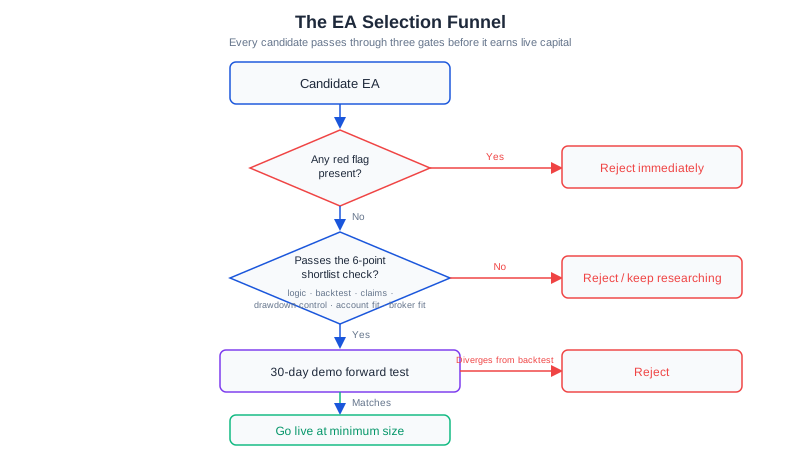
- Understand the strategy — if you cannot describe in one sentence what triggers a trade, do not run it. “Proprietary AI algorithm” is not a description.
- Check the risk controls — hard stop on every trade, a maximum-positions cap, and a drawdown gate. No averaging down.
- Read the backtest critically — several years of data, high modelling quality, and clearly labelled as hypothetical. Check whether losing pairs were disclosed or quietly omitted.
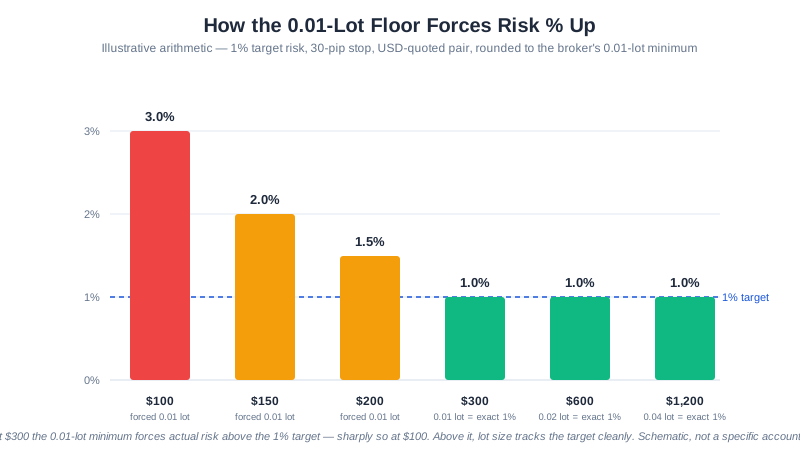
- Match it to your account — an EA sized for $10,000 may be unusable at $200. Check the minimum the position-sizing math actually needs.
- Confirm your broker suits it — some brokers restrict EAs, grid trading, or hedging. Spread matters more the more frequently the EA trades.
- Demo forward-test for at least 30 days — the only test that uses data the strategy was not selected on.
- Start small when you go live — minimum lot sizes for the first month, regardless of how good the demo looked.
The extended version of this checklist, with the specific vendor red flags, is in how to choose a forex EA in 2026.
How to Install and Run an EA
The mechanics are short: copy the .ex4 file into MQL4/Experts (or .ex5 into MQL5/Experts), restart MetaTrader, drag the EA onto a chart, enable AutoTrading, and confirm the smiley icon appears in the chart corner. Full walkthrough with screenshots: how to install an EA on MT4 and MT5.
Two things people get wrong on first run: AutoTrading must be enabled both globally (the toolbar button) and per-EA (the “Allow live trading” checkbox), and the chart timeframe must match what the EA was designed for — an H1 strategy on an M5 chart is a different strategy. Work through the first-trade checklist before the first live position.
Getting Started with Free Forex EAs
We publish seven forex Expert Advisors free, each in MT4 (.ex4) and MT5 (.ex5) builds. Browse the full EA lineup for side-by-side specs, or see the summary below:
- SteadyPips — Conservative EMA(12/26) trend following with an EMA(200) filter
- GridMaster — Grid trading with five independent drawdown-protection layers
- BreakWave — Bollinger Bands squeeze breakout with ADX confirmation
- TripleAlign — Triple-EMA alignment plus ADX trend strength
- SnapBack — 3-sigma mean reversion with RSI exhaustion
- QuickPulse — Fast-RSI contrarian entries with an asymmetric target
- DualHorizon — EMA cross filtered by the H4 trend
Every one has a hard stop on every trade, a position cap, and no martingale logic. Published figures on those pages are hypothetical backtest results, and the pairs that failed our test threshold are named alongside the ones that passed. None of them is expected to be profitable in all conditions — run them on demo first.
Download the free MT4 & MT5 EAs →
Frequently Asked Questions
What is EA in forex?
EA stands for Expert Advisor: a program that runs inside the MetaTrader platform and places, manages and closes trades on your account automatically, following a fixed rule set with no human input. The abbreviation is specific to MetaTrader — elsewhere the same thing is called a bot, a robot or an algo. An EA is an execution tool rather than a strategy in its own right, so it inherits whatever edge, or lack of edge, the rules it encodes already had.
What is a forex Expert Advisor (EA)?
A forex Expert Advisor is an automated trading program that runs inside MetaTrader — written in MQL4 for MT4, or MQL5 for MT5. It continuously analyzes price action and indicators, generates buy/sell signals based on programmed rules, and places orders automatically — including stop loss, take profit, and trade management — without human intervention.
Are forex Expert Advisors profitable?
Many are not. An EA is only as good as the strategy it implements — EAs do not create edge, they automate a defined rule set, and automating a losing rule set simply loses money faster. Even EAs with strong backtests frequently fail live, because a strategy selected for past performance is by construction at risk of being fitted to that data. Any EA advertising guaranteed returns or 100%+ annual ROI is a scam or heavily over-optimized. Treat automation as a way to execute a plan consistently, not as a source of income.
Are free forex EAs any good, or do you have to pay?
Price tells you nothing about quality. Paid EAs on marketplaces are frequently over-optimized martingale systems sold on the strength of a curve-fitted backtest, while some free EAs are well-documented and conservatively built. What matters is whether the strategy logic is disclosed, whether every trade carries a hard stop, whether the published figures are labelled as backtested, and whether you can verify the behaviour yourself on demo. Ask what the free EA’s business model is — ours is disclosed: we are an XM Introducing Broker and earn commission when readers open accounts.
Do I need to know how to code to use an EA?
No. Most retail traders use EAs built by others. You download the .ex4 (MT4) or .ex5 (MT5) file, drag it onto a chart, configure the input parameters (lot size, risk per trade, stop distance), and the EA runs automatically. Coding is only required if you want to build or customize your own EA in MQL4 or MQL5.
What is the difference between an EA and a trading signal service?
An EA executes trades automatically on your account based on programmed rules. A signal service sends you trade ideas (entry, stop, target) that you must manually place. EAs are faster and emotion-free but require correct configuration; signals give you final approval but introduce execution delay and human error.
Can a forex EA run 24/7 without me being at my computer?
Yes — but MetaTrader itself must stay running. To keep an EA active 24/5 when your PC is off, you need a Virtual Private Server (VPS). A forex VPS runs MetaTrader in the cloud with low latency to the broker server. Most reputable forex VPS plans cost $10–30/month. See our VPS for Forex Trading guide.
What broker do I need to run an EA?
Any broker that supports MetaTrader 4 or 5 will run an EA. We use XM because it offers both platforms with a low minimum deposit and permits EAs, grid trading, and hedging without restriction. Note our incentive here: we are an XM Introducing Broker and are paid when you open an account through our links — see the affiliate disclosure. Regardless of broker, avoid ones that prohibit EAs or use a dealing-desk model, as they can requote or disqualify automated trades.
How do I know if an EA is safe to use?
Look for these signals before trusting any EA:
- Clear documentation of the strategy logic, not a black box
- Backtest reports with several years of tick data and high modelling quality, clearly labelled as hypothetical
- Modest rather than spectacular published figures — an extraordinary advertised return is the reason to walk away, not the reason to buy
- A hard stop on every trade, plus drawdown protection such as max-loss limits
- No martingale or loss-averaging logic
- Demo testing for at least 30 days before going live with real money
Which is the best free forex EA for beginners?
For a beginner, a conservative trend-following EA like SteadyPips is the more understandable starting point: fewer signals, strict risk caps, and logic simple enough to follow. Grid EAs like GridMaster trade more often but carry materially higher drawdown risk during strong trends. All seven of our free EAs ship in MT4 and MT5 builds at /download/ — none of them is expected to be profitable in all conditions.
Further Reading
- How to Install an EA on MT4 & MT5 — step-by-step first run
- How to Backtest a Forex EA — and why most published backtests mislead
- How to Choose a Forex EA in 2026 — the vendor red-flag checklist
- Forex Risk Management Guide — position sizing and drawdown limits
- Backtest results & methodology — our published hypothetical figures
This article is for educational purposes only. Automated trading involves risk. Past performance is not indicative of future results. Never trade with money you cannot afford to lose.